Exit
An Exit is a data structure in the Neo World Program. It represents an exit in a Room.
Attributes
Exits are the internal data structure linking Rooms to one another. As such, most of their attributes serve this purpose. Note that if an attribute is internal, that means it only exists within the Exit class. Internal attributes will be given in the “Class attribute” bullet point, preceded by their data type. If an attribute is external, it only exists on the spreadsheet. External attributes will be given in the “Spreadsheet label” bullet point.
Name
- Spreadsheet label: Exits
- Class attribute: String
this.name
This is the name of the Exit. All letters should be capitalized, and spaces are allowed. For clarity’s sake, it should usually be mentioned in all descriptions of the Room it belongs to, unless it is supposed to be hidden.
Position
- Class attribute: object
this.pos
This is an internal attribute whose properties are the X, Y, and Z coordinates of the Exit. For more information, see the article on Maps.
X
- Spreadsheet label: X
- Class attribute: Number
this.pos.x
This is the X coordinate of the Exit.
Y
- Spreadsheet label: Y
- Class attribute: Number
this.pos.y
This is the Y coordinate of the Exit.
Z
- Spreadsheet label: Z
- Class attribute: Number
this.pos.z
This is the Z coordinate of the Exit.
Unlocked
- Spreadsheet label: Unlocked?
- Class attribute: Boolean
this.unlocked
This indicates whether the Exit is unlocked or not. If this is true, then Players can travel through this
Exit. If it is false, then the Player will simply be told that the Exit is locked.
Destination
- Spreadsheet label: Leads To
- Class attribute: Room
this.dest
This is the Room that the Exit leads to. When a Player travels through this Exit, their permission to view the channel of their current Room will be revoked and they will then be given permission to view the channel associated with the Exit’s destination. Needless to say, when entering a destination on the spreadsheet, it must match the name of the desired Room exactly.
Link
- Spreadsheet label: From
- Class attribute: String
this.link
This is the name of the Exit in the destination Room that this Exit leads to. That Exit must also have this Exit as its link. That is, Exits must link back to one another in both directions. For example, in a set of two Rooms, each with one Exit only, their Exit tables must look like this:
| Room Name | Exit | Leads To | From |
|---|---|---|---|
| room-1 | DOOR | room-2 | EXIT |
| room-2 | EXIT | room-1 | DOOR |
Description
- Spreadsheet label: Description
- Class attribute: String
this.description
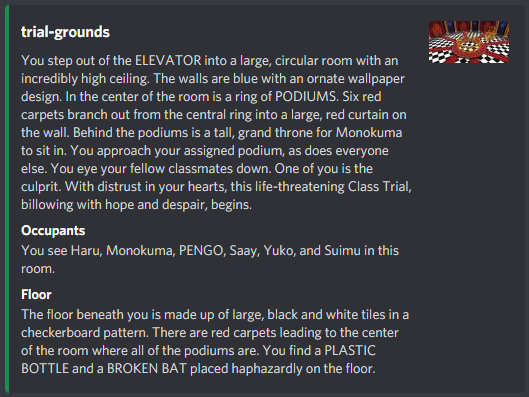
This is the description of the Room coming from this Exit. That is, when a Player enters a Room from this Exit, they will receive a parsed version of this string. The Player will not be sent the Exit’s description by itself. Instead, they will be sent a Discord Embed containing:
- The name of the Room.
- The description of the Exit they entered from.
- The Room’s occupants, excluding the Player themself.
- The description of the Room’s default drop Object. If the Room doesn’t have one, “You don’t see any items.” will be sent instead.
- The Room’s icon URL. If the Room does not have one, then the default Room icon URL will be used instead. If no default Room icon URL is set, then Alter Ego will use the server icon instead. If the server icon is not set, then no image will be sent in the MessageEmbed.
See the article on writing descriptions for more information.
Row
- Class attribute: Number
this.row
This is an internal attribute, but it can also be found on the spreadsheet. This is the row number of this Exit in a Room.